In this guide
Hotpoint Washer and Dryer Troubleshooting: A Step-by-Step Guide
When a Hotpoint washer or dryer starts acting up, you don’t always have to wait for a repair technician. Some problems are simple to check, and many Hotpoint washers even have a hidden diagnostic mode that can show you what’s wrong. This guide walks through the basics, explains how to access that diagnostic mode, and helps you know when to stop and call a professional.
Know Your Machine Before You Start
Hotpoint has a range of washing machines and dryers, and the features can change depending on the model. Many newer top-load washers include a stainless-steel basket, a heavy-duty agitator, PreciseFill with four water-level selections, load-size selection, Deep Rinse, automatic bleach and fabric-softener dispensers, rotary electronic controls with cycle status lights, and a 700 RPM spin speed [3]. Electric dryers in the same lineup often offer Auto Dry, an aluminized alloy drum, three heat selections, a delicate cycle, rotary electromechanical controls, an upfront lint filter, an end-of-cycle signal, and a reverse-a-door feature [3]. The manufacturer also says the machines are designed to handle large loads, with special cycles to care for different fabrics [5].
Of course, not every feature appears on every model. If you need to troubleshoot, start by writing down your model number. Repair resources like RepairClinic offer model-specific guides once you know the machine you’re working with [2]. Before ordering any parts, verify the exact configuration and current details on the manufacturer’s site or a reputable retailer listing.
Safety Step: Disconnect the Power
Before you open any panel, remove any screws, or work near electrical parts, disconnect the appliance from its power source and leave it disconnected [1]. In some cases, a small amount of water may spill when you remove hoses or a pump, so have a towel and a bucket ready. If you need to test a component with a multimeter, you’ll need the correct resistance or voltage values for your model. On some Hotpoint washers, the service manual is tucked inside the machine, either under the washer or behind the back plate [4]. Look for it early—it can save you from guessing.
Hotpoint Washer Troubleshooting
Simple Checks First
If your washing machine won’t respond, don’t automatically assume the worst. Many Hotpoint washers use rotary electronic controls with cycle status lights that show you where the machine is in the cycle [3]. When the machine stops, look at those lights to see whether it stopped in fill, wash, rinse, or spin. That tells you which part of the cycle to focus on.
Because Hotpoint top-loaders include load-size selection and PreciseFill with four water-level choices [3], a quick check of the control settings is always worthwhile. The manual for your model will show you how to match those settings to the load you’re washing. Machines with automatic bleach and fabric-softener dispensers add those products at the right time in the cycle [3], but you still need to pour them in carefully and clean up any residue before it dries.
Entering the Hidden Diagnostic Mode
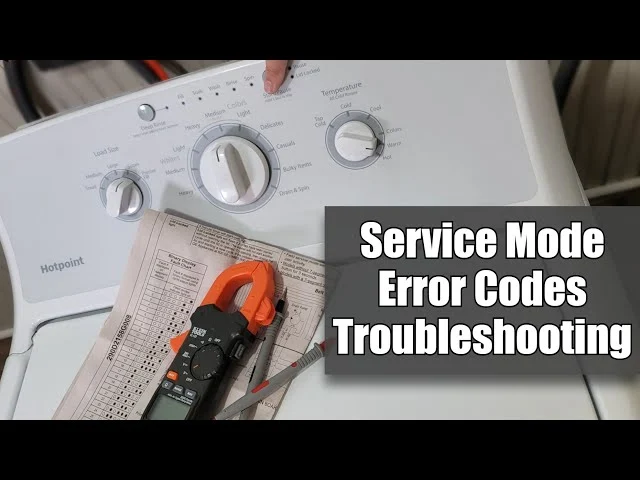
One of the best ways to get a clear answer from a Hotpoint washer is to enter the hidden service or diagnostic mode. This mode is not available on every model, and it is meant for someone who can read service codes, but it can help you find a specific error. On some models with a rotary control dial and a light strip that runs from Deep Rinse/Fill to Lid Lock, here’s how to try it [4]:
1. Press and hold the Start/Pause button.
2. While holding Start/Pause, turn the control dial clockwise seven clicks or increments.
3. Release Start/Pause on the seventh click.
4. If the machine entered service mode, all of the lights from Deep Rinse/Fill to Lid Lock should flash on and off at the same time [4].
5. From there, turning the dial clockwise moves forward through the service code order, while turning it counterclockwise moves backward.
6. Press Start/Pause again to activate the service mode shown at the bottom of the display.
The same video notes that the light configuration matters: this procedure matches a specific style of Hotpoint console that has been around for about seven years [4]. Don’t be surprised if a newer model uses a different way to enter service mode.
Once you’re in diagnostic mode, you can force the washer to run certain operations without taking the machine apart [4]. For example, if you need to see whether a pump or an actuator works, the service mode may be able to activate it. If you have a multimeter, you can also test components electrically. On some Hotpoint washers, remove the back panel from the machine by taking out the two hex-head screws at the back, then pull the back plate off [4]. The control board and sometimes the service manual will be there. Be sure the power is disconnected before opening the back, and use the manual’s recommended resistance or voltage values [4].
Suggested read: How to Install a Pressure Washer Hose Reel: A Step-by-Step Guide
What to Do With an Error Code
If the diagnostic mode gives you an error code, don’t start buying parts right away. The code points you to the system involved, not always the exact failure. A model-specific repair guide can help you interpret the code and walk you through tests [2]. If you’re not comfortable using a multimeter or the service manual terms are unclear, take a photo of the code and call a technician. That image helps them arrive with the right parts.
Hotpoint Dryer Troubleshooting
Start With Lint and Airflow
Many Hotpoint dryers place the lint filter upfront [3], which makes it easy to clean before every load. The upfront location lets you clear it quickly. If you notice clothes coming out damp after a full cycle, include the lint filter and exhaust vent in your routine checks. The right way to clean the vent depends on your setup, so check the manufacturer’s instructions for your house and model.
Heat Selections and Auto Dry
Hotpoint dryers come with three heat selections and a delicate cycle [3]. If your clothes feel too hot or seem too stiff, you may have picked the wrong heat setting. Delicate cycles are meant for lower heat, so clothes that are not sensitive to heat may simply not dry as quickly under that setting.
The manufacturer lists an automatic thermostat as part of the dryer design [5]. If the drum turns but the air never feels warm, a model-specific repair guide can show you how to locate and test the thermostat and heating element [2]. Always verify the exact part before ordering it.
Door Reversal and End-of-Cycle Signal
Some Hotpoint dryers have a reverse-a-door feature, which means you can install the door to open from either side [3]. If you’re moving the machine to a new spot and the door hits a wall, check the manual before unscrewing anything. Also, an end-of-cycle signal can let you know when the load is done [3]. If you never hear the chime, your manual will tell you how to enable or adjust it.
If Your Hotpoint Washer-Dryer Has Special Cycles
Not all Hotpoint laundry machines sold in the United States are the same, but some washer-dryer models include cycle-specific adjustments. On one 9 kg washer-dryer, for example, the wool program limits temperature to 40°C (104°F) and spin speed to 800 rpm, while the delicate program uses a maximum of 30°C (86°F) and 600 rpm [6]. If your model lists those kinds of limits, follow them—especially for delicate and wool items.
That same model has a Steam Hygiene option that steams the wash load to remove up to 99.9% of viruses and bacteria [6]. During the steam operation, the porthole may become hazy [6]. If your machine has a steam cycle, use it according to the manual and don’t worry about a temporary haze. Some models also have a rapid option that shortens the program, but it won’t work on every cycle [6]. Check the manual before selecting it.
When to Call a Professional
A troubleshooting guide is not a substitute for a service manual. If you can’t identify a simple cause, or if an error code leads to a part you’re not sure how to test, it’s better to call for help than to start taking the machine apart. If your appliance is under warranty, contact Hotpoint before trying anything that might void coverage. For older machines that are out of warranty, a model-specific repair resource can help you decide whether the repair is worth doing yourself [2].
Prices and availability also change. For example, one Hotpoint top-load washer was listed with an MSRP around $529 in a review [3], but that was a snapshot. Always check the current manufacturer or retailer listing for pricing, stock, and model-year details.
Sources
1. Fred’s Appliance: How To Troubleshoot And Resolve Common Hotpoint Washer Repair Issues\n https://academy.fredsappliance.com/washer-training/how-to-troubleshoot-and-resolve-common-hotpoint-washer-repair-issues
2. RepairClinic: Hotpoint Washing Machine Repair & Troubleshooting\n https://www.repairclinic.com/RepairHelp/Washing-Machine-Repair/11-95–/Hotpoint-Washing-Machine-Troubleshooting
3. Spencer’s TV: Hotpoint Washer and Dryer Reviews\n https://www.spencerstv.com/blog/hotpoint-washer-and-dryer-reviews
4. YouTube: Hotpoint Washer Troubleshooting, Error Codes, and Diagnostics\n https://www.youtube.com/watch?v=ciGBLtG2KSM&vl=en
5. Hotpoint: Washer, Dryer, and Laundry\n https://www.hotpoint.com/washer-dryer
Suggested read: Hotpoint Washer Not Spinning: A Step-by-Step Troubleshooting Guide
6. YouTube: Hotpoint NDBE9635 9Kg Washer Dryer Instructions and Explanation\n https://www.youtube.com/watch?v=pzr4Y65FRpY